Toon Shader Pack
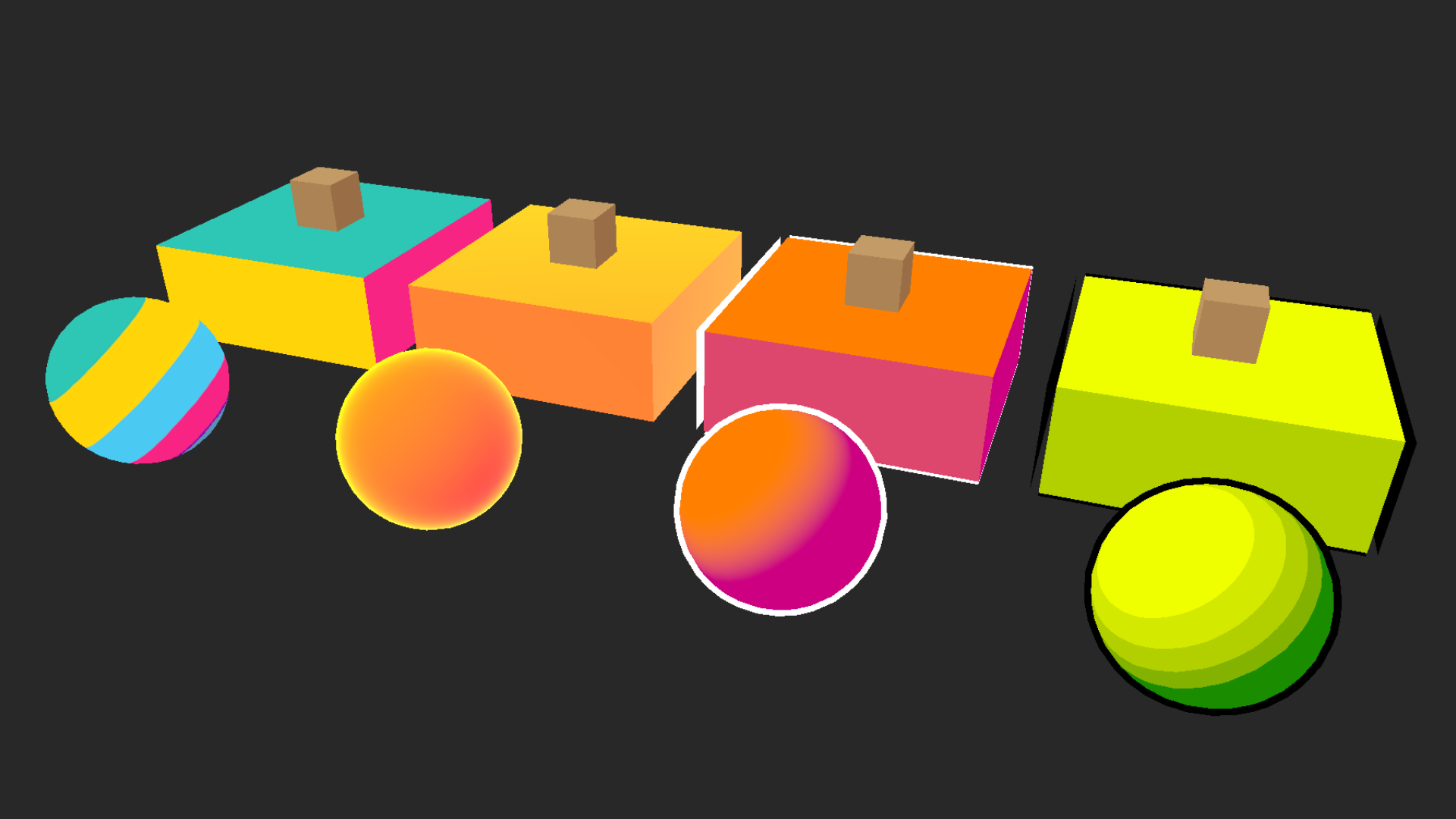
The Toon Shader Pack provides matching handwritten shaders for Unity's Built-in Render Pipeline and Universal Render Pipeline (URP), with flexible toon shading, scene lighting, rim light, and inverted-hull outlines.
- Requirements
- Quick Start
- Surface
- Toon Shading
- Scene Lighting
- Rim Light
- Outline
- Troubleshooting
- Known Limitations
- Support
- Changelog
Requirements
- Tested with Unity 2022.3 LTS and Unity 6.0 LTS.
- Supports the Built-in Render Pipeline and URP. HDRP is not supported.
- URP usage requires the Universal Render Pipeline package and an active Universal Render Pipeline Asset. The package does not automatically convert a Built-in project to URP.
- Mesh normals are required for lighting, rim light, and outlines. The Vertex Alpha shading source also requires vertex colors.
Quick Start
Paths in this guide are relative to Assets/HaniJahanDesign/Shaders/Toon/.
- Open the demo scene matching your render pipeline:
- Built-in:
Scenes/Shaders_Toon_Demo_BuiltIn.unity - URP:
Scenes/Shaders_Toon_Demo_URP.unity
- Built-in:
- Assign a preset from
Materials/BuiltIn/orMaterials/URP/to a mesh. - Adjust the material in the custom material inspector.
To create a material from scratch, choose Hani Jahan Design/Toon/Built-in or Hani Jahan Design/Toon/URP from its Shader menu.
Surface
Base Map provides the surface texture. Tint multiplies the texture, toon color, and alpha. The shader renders as an opaque material, so alpha can affect the calculated color but does not make the surface transparent.
Toon Shading
Enable Toon Shading and choose a Shading Source to produce a value from dark to light:
| Source | Description |
|---|---|
| Main Light | Uses the main light direction and the Scene Lighting controls. |
| World Up | Maps downward-facing to upward-facing world-space normals. |
| Object Up | Maps downward-facing to upward-facing object-space normals. |
| World Height | Creates a gradient from the vertex's world-space height. |
| Object Height | Creates a gradient from the vertex's object-space height. |
| View Angle | Uses a Fresnel-style value based on the viewing angle. |
| Vertex Alpha | Reads the mesh vertex color's alpha channel. |
| Mask Texture | Reads the red channel of Mapping Mask, including its tiling and offset. |
World Height and Object Height evaluate height * Height Scale + 0.5. Under Advanced, Shading Offset shifts the selected source and Shading Contrast biases it after the offset.
Next, choose how Color Mode converts that value into color:
- Color Ramp: Samples a horizontal ramp texture, with dark on the left and light on the right.
- Smooth Two Color: Blends continuously from Shadow Color to Lit Color.
- Hard Two Color: Separates the two colors at Shadow Size. Set Shadow Softness to zero for a crisp boundary or raise it slightly to reduce aliasing.
- Color Steps: Makes 2–8 evenly spaced bands between the two colors. Step Softness controls the boundaries between bands.
Disable Toon Shading to use the Base Map and Tint without authored toon colors. Rim and Scene Lighting can still affect the result.
Scene Lighting
When enabled, Scene Lighting reads the pipeline's main light direction and ambient spherical harmonics. It is intentionally lightweight and does not sample realtime or baked cast-shadow maps.
- Ambient Strength: Controls how much ambient lighting brightens the authored surface color.
- Wrap: Moves directional light around the sides of the model.
- Shadow Falloff: Reshapes the main-light response.
- Light Strength: Scales the main-light response.
- Direction Override: Under Advanced, supplies a custom XYZ light direction. Leave XYZ at zero to follow Unity's main light.
Wrap, Shadow Falloff, Light Strength, and Direction Override apply when Main Light is the shading source. Ambient Strength can affect every shading source.
Rim Light
Rim light adds color near silhouettes based on the angle between the surface normal and camera:
- Rim Color: Color and alpha multiplier for the effect.
- Rim Power: Controls the rim's width; higher values make it narrower.
- Rim Intensity: Controls brightness.
The final output is clamped, so strong rim settings can reach solid white or the maximum available color channel.
Outline
Outline renders an expanded, back-facing copy of the mesh before the surface:
- Outline Color: Solid outline color.
- Outline Width: Expansion along each vertex normal, measured in object-space units. Scale and mesh topology therefore affect the apparent width.
- Outline Depth Offset: Shifts the expanded hull in clip-space depth to help with overlap artifacts. Start at zero and use small adjustments only when needed.
Hard edges, split normals, open meshes, very small details, and non-uniform scaling can create gaps or uneven outline thickness. Outline is a geometry-based inverted hull, not a screen-space outline, and does not add outlines between colors on the same surface.
Troubleshooting
- Pink material: Use the shader matching the active pipeline. For URP, install and configure URP and assign a Universal Render Pipeline Asset; then check shader compile errors in the Console.
- Flat or unexpected Main Light shading: Enable Scene Lighting, confirm the scene has an enabled main directional light, and reset Direction Override XYZ to zero. This shader does not receive cast shadows.
- Ramp appears reversed or uniform: Place dark colors on the ramp's left and light colors on its right; verify the texture import and wrap settings.
- Mask Texture has no effect: Choose Mask Texture as the Shading Source and put grayscale data in the texture's red channel.
- Vertex Alpha has no effect: Confirm that the mesh contains varying vertex alpha values; a normal texture's alpha is not used.
- Height gradient is misplaced: Choose world height for a scene-wide gradient or object height for a gradient that follows the object, then adjust Height Scale and Shading Offset.
- Outline is missing: Enable Outline, use a mesh with valid normals, increase Outline Width for the object's scale, and check that Outline Color contrasts with the surface.
- Outline is uneven: Apply or normalize object scale where practical and inspect the mesh normals. An inverted hull follows vertex normals and object-space scaling.
Known Limitations
- The shader is opaque and does not provide transparent surface blending.
- Scene Lighting uses main-light direction and ambient lighting but does not receive realtime or baked cast shadows, additional lights, reflection probes, or physically based highlights.
- The outline is an object-space inverted hull. Its apparent width varies with object scale, distance, projection, mesh normals, and topology.
- The shaders require shader model 3.0-capable targets.
Support
Publisher: Hani Jahan Design
Use the support contact on this asset's Unity Asset Store publisher page, or join the HJD Discord for feedback and community help.
Changelog
1.0.1
- Fixed URP toon objects missing from the camera depth texture by adding a dedicated depth-only pass, restoring depth-based intersection effects such as stylized water foam.
1.0.0
- Initial Unity Asset Store release.
- Added matching handwritten shaders for the Built-in Render Pipeline and Universal Render Pipeline (URP).
- Added eight shading sources, four color modes, optional scene lighting, rim light, and inverted-hull outlines.
- Added four ready-to-use toon material presets and one demo scene for each supported render pipeline.
- Added a shared HLSL implementation and a custom material inspector for both shaders.
- Added setup instructions, control reference, compatibility notes, troubleshooting guidance, and a package welcome window.
- Tested with Unity 2022.3 LTS and Unity 6.0 LTS; HDRP is not included.